Do you need to test for DoS attacks in a PCI Penetration test?

ANSWER: NO

With respect to PCI compliance, testing of vulnerabilities or mis-configurations that may lead to DoS attacks which target resource network/server) availability should not be taken into consideration by the penetration testing since these vulnerabilities would not lead to compromise of cardholder data.


Source: PCI SSC – Information Supplement: Requirement 11.3 Penetration Testing

Answer is found on page 4.

Encoding, Encryption, Hashing: what is the difference?

This sounds pretty similar to a question you might find in a CISSP exam. Since in it is a multiple questions exam, what would you pick among these 4 as the only correct one?

a) They all transform data into another format.

b) Hashing and Encryption are essentially the same while Encoding is very different from those.

c) They are all  reversible processes to transform data into another format.

d) All are methods to protect confidentiality of data.

Correct answer? a).

All thee are methods to convert data into another format. They are used for different purposes which I will explain soon.

One important difference among them is that hashing is the only non-reversible method: you cannot go back to the original data once it has been hashed. So what would you need it, then, if you have no way to get back to the original one?

You will use Hashing to ensure data integrity: if data has changed, you will be aware of that. It does not prevent modification, it will just make you aware if integrity of data is being preserved or not.

Hashing is used in conjunction with authentication to produce strong evidence that a given message has not been modified. Going a bit more in technical detail, this is accomplished by taking a given input, encrypting it with a given key, hashing it, and then encrypting the key with with the recipient’s public key and signing the hash with the sender’s private key. When the recipient opens the message, it will be decrypted with the private key, hash the message themselves and compare it to the hash that was signed by the sender. If they match it is an unmodified message, sent by the correct person. So all good news, and of course, without human intervention: it is all done in no time by the email client used by the recipient.

The purpose of Encryption, instead, is to transform data in order to keep it secret from others, hence ensuring its confidentiality: the goal is to ensure the data cannot be consumed by anyone other than the intended recipient(s).

Encryption transforms data into another format in such a way that only specific individual(s) can reverse the transformation (unlike Hashing, when nobody can revert the transformation). The transformation happens through the usage of generally 2 keys (private and public: this is the case of asymmetric encryption) or even just one, when both encryption and decryption can be done through the same keys. For several reasons asymmetric encryption is much more widely used than symmetric encryption.

And how about Encoding? The purpose here is very different. You won’t transform the date to protect it or to verify its integrity: you will do so to make sure that the intended recipient (more specifically the software application) meant to consume it is able to do so. It is almost as a translation service in which you convert words into another language because otherwise the 2 individuals would not understand each others. As simple as that. The purpose here is then to preserve the usability of data.

Encoding transforms data into another format using a scheme that is publicly available so that it can easily be reversed. It does not require a key: the only thing required to decode it is the publicly available algorithm that was used to encode it.

IN SHORT:

  • Hashing is used for validating the integrity of content by detecting all modifications which result into changes to the hash output.
  • Encryption is used for maintaining data confidentiality and requires the use of a key (kept secret) or two (one secret, one public) in order to return to the original plain text.
  • Encoding is used for maintaining data usability and can be reversed by employing the same algorithm that encoded the content. No key is used.

A not-so-technical discussion about Single Sign On (SSO) and Reduced Sign On (RSO) and Federated Authentication

Single Sign On (SSO) is the ability for a user to enter the same id and password to logon to multiple applications within an enterprise. With this property a user logs in once and gains access to all systems without being prompted to log in again at each of them. This is typically accomplished using the Lightweight Directory Access Protocol (LDAP) and stored LDAP databases on servers.

The term is actually a little ambiguous. Sometimes it’s used to mean that (1) the user only has to provide credentials a single time per session, and then gains access to multiple services without having to sign in again during that session. But sometimes it’s used to mean (2) merely that the same credentials are used for multiple services; the user might have to login multiple times, but it’s always the same credentials. So beware, not all SSO’s are the same in that regard. Most people only consider the first case to be “true” SSO.

The main reason to justify its adoption is probably not the one most of us would guess. While the easy guess would be to improve user acceptance and experience (since nobody likes to remember multiple account names and passwords, even less when many of which expire every 3 months such as most best practices require), reality is that today company choose SSO solutions with the primary purpose of saving costs and improving security.

This latter part may be counter-intuitive. In fact, if an account is stolen by a malicious user, this user will be able to access a multiplicity of applications, with an increased damage potential vs. a situation in which that stolen credential would grant access to just one application or storage area. However, nowadays one of the most frequent reasons for which credentials are stolen by hackers is that the password chosen by the user is too weak (either too short or easy to guess), which happens to be a consequence of the aversion of users to remember many usernames and passwords. At the end of the day, there are only so many noteworthy dates, old pets’ names and memorable combinations of numbers and letters we can all keep track of. And constantly having your staff reset passwords—either by policy or because they frequently forget— costs your business time and money. With SSO is somehow simpler to ask users to choose a strong password, under the reassurance that it is the only one they have to remember (at least until expiration). The help desk calls to request password resets are reduced and overall everybody is expected to be happier: users are less frustrated and companies save money.

Since passwords are the least secure authentication mechanism, single sign on has now become taken the form of a Reduced Sign On (RSO),  since more than one type of authentication mechanism is used according to enterprise risk models. For example, in an enterprise using SSO software, the user logs on with his unique id and password. This grants him immediate access to low risk information and applications such as the enterprise portal. However, when the user tries to access higher risk applications and information, like a payroll system, the single sign on software requires them to use a stronger form of authentication. This may include digital certificates, security tokens, smart cards, biometrics or combinations thereof. In other words, Reduced Sign On (RSO) provides a way to reduce the number of authentication processes for users (generally to maximum of 2 factors of authentications only).

SSO and RSO can also take place between enterprises using federated authentication. A federated identity management system provides single access to multiple systems across different enterprises. This is an example of how it works:

  • An employee of a business partner of your enterprise may successfully log on to their enterprise system.
  • When he clicks on a link to your enterprise’s application, the business partner’s single sign on system will provide a security assertion token to your enterprise.
  • Your enterprise’s SSO software receives the token, checks it, and then allows the business partner’s employee to access your enterprise application without having to sign on. End.

And it may also work 2-ways depending on the agreements among business partners: the employees of your enterprise may be allowed to access the enterprise system of that business partner without the need to authenticate again.

With enterprises relying more and more on Cloud Service Providers for a large set of their business functions, the need of SSO or RSO is only expected to increase. 


For those of you wanting to go more in depth in this topic, I recommend reading the Whitepaper below (click on the image to download the whitepaper in pdf version) produced by Ping Identity Inc, a company which offers, as you’d expect, federated identity management and single sign-on (SSO) services on a subscription basis.


SSO

5-reasons-its-time-for-secure-sso-white-paper

The paper highlights an important difference between Federation and Cloud-based SSO.

Federation has one major advantage over most cloud-based SSO products: the user’s identity and password is stored in a single place controlled by the user’s organization. Federation is based on the notion users can authenticate once with their organization and that authentication is good for all other applications that the users are authorized to access. Rather than storing and forwarding many usernames and passwords like most cloud-based SSO products, Federation uses standard encrypted tokens to share the users’ authentication status and identity attributes to facilitate access to applications.

The paper also provides enterprises with five reasons to consider moving to secure single sign-on (SSO)–and to urge application vendors to move to a secure, standards based approach too.
1. Enhance customer engagement:

This is the reason that probably requires the least explanation. The survey behind the whitepaper reveals, for example, that:

  • 27% of organizations require that their employees remember six or more passwords
  •  The average corporate user maintains 15 passwords within both the private and
    corporate spheres
  • 60% of people say they cannot memorize all of their passwords
  • 61% of consumers reuse passwords among multiple websites

2. Answer BYOD (Bring Your Own Device) and mobile access demands:

As smartphones and tablets become the de facto devices used to access the Internet, users will expect secure and seamless mobile access to business-critical applications and resources anytime, anywhere.
If a company’s existing identity and access management solution cannot accommodate mobile devices, or if its customers and employees can’t access apps from any location or device, a key revenue and productivity opportunity is being missed.

  • Federated SSO keeps corporate data secure. Removing authentication and access from mobile applications allows IT to centralize access control as well as streamline audit and reporting to ease governance and compliance requirements.
  • All users get access with one identity, regardless of device. If your identity and access management system takes a standards-based approach, users can leverage one identity to access your apps and services. Your workforce, customers or partners can use their personal devices and tablets to gain access to business apps.

3. Lower costs

How Federated SSO translate to savings? It will:

  • Reduce the annual volume of inbound password reset requests from the workforce and decrease staffing and resource requirements for the helpdesk. According to Ping Identity, non-automated password resets cost on
    average $30 per employee per reset.
  • Decrease administrative costs due to automated Internet user account management.

4. Improve security

When the number of applications running outside of an organization’s firewall increases, so does the risk of password theft. The more unique usernames and passwords a user must memorize, the higher the chance they will choose easy-to-guess passwords (“password fatigue”). Also, the chance is greater that they will store those passwords in places they can easily be stolen.

Username and password management is an employee burden that also impacts IT. If your IT department manages user access manually (and that happens more frequently than you may think…), there’s a chance that there are “zombie accounts” in your enterprise. Zombie accounts are active user accounts that belong to users who have been otherwise deactivated. At best, this presents a problem for IT security and compliance, but also a cost since many cloud-based applications’ pricing models are per user per month.

Federated SSO solves this challenge by centralizing user access management. When a user is deactivated in the enterprise, access to all apps is deactivated.

And let’s not forget this infographic which joins together cost and security, which is only to be expected:

SSO-fedID
5. Increase productivity

With Federated SSO, users can reduce the amount of time spent on redundant login attempts across applications, increasing available capacity for conducting more critical business activities.

  • For your workforce, SSO means that they have only one set of credentials to manage. With mobile and Internet SSO, employees can do more work when away from their desks.
  • For IT departments, centralizing access control means one place to manage andmonitor app access. In addition, less calls to the help desk for password issues also boosts productivity for IT and general staff.
  • For your partners, SSO means that they can securely and conveniently do business with your organization.


For those of you who have not had enough yet about this topic, I recommend reading also this document enlisting no less than 101 Things to Know About Single Sign On.

Also, for those wanting to know more about SSO and LDAP authentication, here is another article worth reading: SSO And LDAP Authentication

A not-so-technical discussion about Software Vulnerabilities

Disclaimer: if you are not yet familiar with this Information Security forum, please note that the material here collected is meant for usage of an essentially non-technical audience. IT Security professional will certainly find this content “light-weight” from a technical perspective.


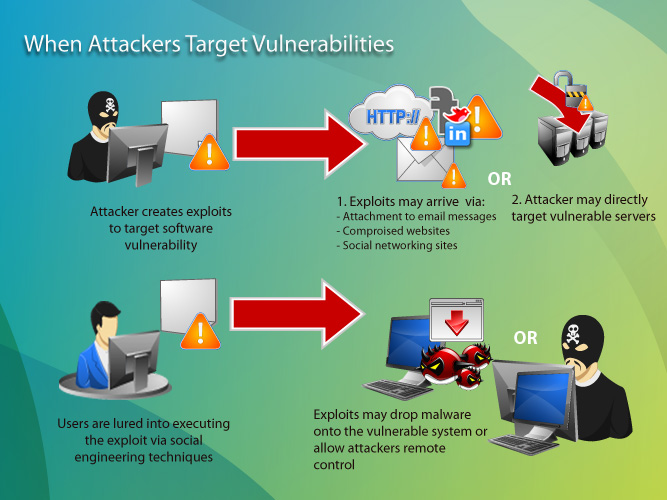
This post will try dig into the topic of Software security. Most non-trained audience in Information Security is familiar with terms such as Vulnerabilities, Exploits, PatchesCyber-attacks, which relate with Software Security. The relation among those terms is the following: most Cyber-attacks are possible because of the existence of software Vulnerabilities in Applications or Operating Systems which attackers are able to exploit. More precisely, attackers are able to take advantage of a vulnerability through what is called an “Exploit”, software code which allows them to gain unauthorized access to a system or to compromise its functionality (denial of service attack) .

Software vulnerabilities represent security gaps resulting from unintended flaw (errors) in software code or a system that leaves it open to the potential for exploitation in the form of unauthorized access or malicious behavior;   Vulnerabilities can be closed by software vendors through patches: it is up to the user to apply the patch, and quite surprisingly there is a small minority who apply them in a timely fashion. While for home users this is essentially unjustifiable, companies may have good practical reasons for being unable to patch on a regular and timely basis. Unless companies have a Vulnerability Management Process in place, chances are that their patching activity is other than timely and not performed on a regular basis; even when a Vulnerability Management Process is in place, it is my experience that companies may have a hard time to patch systems on a regular basis, sometimes for lack of resources within the Operation teams, sometimes because the testing phase of the process produced results which affected performance in a negative way.

This infographic produced by Trend Micro explains quite effectively how Cyber-attacks succeed:

03920122011

One common way to exploit a system is through the usage of Malware, parasite software which in stealth mode will perform undesirable actions leading to system and information compromise.

Some internet domains, generally referred as “Malicious domains” are known to be offenders in this area by trying to install malware by either exploiting browser vulnerabilities or gullible user behavior (acceptance of the browser request to install some form of software, often camouflaged under a fake name, such as “latest version or Flash needed to play the content you selected” or other easily recognizable names by most users). If you are unsure whether a domain is safe (malware-free), Trend Micro offers a tool in this page. And you might be surprised to discover that most of the malicious domains are registered not in Russia, China or Africa, but rather in the United States, according to the findings of Trend Micro summarized below:

Top malicious country sources


As previously mentioned, Software vendors when becoming aware of a new vulnerability in their products will take action to release a Patch which, when applied by the product user, will eliminate the vulnerability and will restore the intended safe operation of the software.

So what happens in between the moment in which a vulnerability exploit is released by hackers and the moment in which the software vendor releases the patch? This is the ground in which the so called “Zero day attacks” will go wild and likely deliver the expected results to the hackers behind them. Zero-day attacks occur during the vulnerability window that exists in the time between when vulnerability is first exploited and when software developers publish a counter to that threat. Zero-Day exploits are usually posted by well-known hacker groups. Software companies then issue a security bulletin or advisory when the exploit becomes known, but they may not be able to offer a patch to fix the vulnerability for some time after: when they do release it immediately, chances are that they “bought” the resolution from the same authors of the exploits (often true also for Anti-virus software vendors). It is a fact that one of the stronger motivations of hackers to develop vulnerability exploits is to sell the “antidote” to software vendors before zero day attacks run wild.

This study conducted by Secunia Inc. found that, in 2013, 86% of the vulnerabilities of the top 50 software programs are available on the day of disclosure, hence only 14% of the vulnerabilities are subject to zero-day-attacks (10% in 2012).


Patches zero day


The same study, when its scope is not limited to the top 50 software programs, found out that in 2013 79% of all software has a patch available in the same day a vulnerability is discovered.


Patches zero day all sftw


Another interesting finding from the Secunia study is the growing trend of vulnerabilities in the last 5 years, which seems to reinforce the idea that “discovering and exploiting vulnerabilities is profitable business these days”.


Vulnerability 5-y trend


Also, while the number of discovered vulnerabilities is growing (over 13,000 in 2013), the number of affected software products is decreasing (2289 in 2013) as shown in the chart below:


vuln-prod


Among those over 13,000 vulnerabilities discovered in 2013, just under 16.7% were classified highly or extremely critical. Out of 13,073, this percentage represents a hefty number of vulnerabilities : 2184 !


vuln criticality


And, if you were wondering, no less than 73% of those discovered vulnerabilities can be exploited from remote. So most of them are exploitable by cyber-attackers located all over the world.


vuln vector


If you want to read more, you can download the whole Secunia study here:  secunia_vulnerability_review_2014.


Once the counter is out, that exploit is no longer a “zero day exploit”. So does it mean that the threat is no longer there? No, at least until the patch is applied, which requires some form of user intervention. So cyber-attackers can still count on some form of user-inaction to continue exploiting systems affected by a known vulnerability.

Among home-users, the need for patching is not fully understood. Most non-technical users follow the reasoning that “If my system is running fine, why would I bother patching it? After all it takes quite a bit of time…”. This obviously denotes a low risk perception in most users. In fact there are many psychology studies which have proven that the more we like an activity or tool, the less we perceive its risks. So enthusiastic computer users do not fully perceive all the hazard out there. They might be concerned about the safety of their house door and windows (and justifiably so) in order to prevent theft from physical attackers, but not so much from theft from virtual attackers, which are in an enormously larger number than the thieves who may try accessing your home.

Among companies, the need for patching their systems is generally better understood, but they seldom do it timely, if they do at all.

One recent study of 2013 showed that only 36% of small business apply security patches at all and it concludes that “it is no wonder that cybercrooks are stealing their cash“. In fact, taking the U.K. as an example, the FSB (Fedearation of Small Business) has estimated that  small firms lose about 700 million pounds every due to cybercrime activities (read more here). The average attack caused Small and Medium Business (SMB) between £35,000 and £65,000 worth of damage – while large firms breaches set them back by an average of £450,000 to £850,000, although several individual breaches cost more than £1m (read more here). The same survey also revealed that 93 per cent of large organisations (those which employ more than 250 workers) had reported security breaches in the past year, while the percentage of small and medium business affected by at least a security breach is 87%.


breaches survey


You can download the whole report here: 2013-information-security-breaches-survey-executive-summary


So even though there is a cost to it, evidence is there that not just home users but also businesses are not timely in their patching, if they do it at all. One of the most striking evidence of this was provided to the general public earlier this year when Heartbleed was discovered as a huge OpenSSL encryption bug. Users were told their account on multiple web site affected by the bug (the sites using version 1.0.1 and 1.0.2-beta releases of OpenSSL,) were compromised and, at the same time, they were told not to update their account on each web sites until those were properly patched. And it took a long while until all the affected sites were patched. CNET and other sites published and regularly updated a list of web sites which had been patched. It did take a long while until the list of sites still at risk became empty.

The main reasons why companies do not patch their systems immediately are generally rooted into either lack of resources or the time needed for the patching process to complete.

An appropriate Vulnerability Patching Process (also called System Patching Process) is a fairly complex process which can be quite resource intensive. A test environment, ideally an identical copy of the production environment, should be available to test the systems after the patches are applied. This is no trivial effort. Testing is the crucial part of the Patching process. No software vendor can guarantee that the interaction of that software with the rest of the ecosystem which it is part of will remain flawless after the patch is applied. For example, when Microsoft releases a Windows patch it does not guarantee that whatever software you have installed in your workstation or server will continue to work as before once the patch is applied. You have to test by yourself. Sometimes warnings are released along with the patch (“known issues”) as a clue of what could happen. Other software vendors may list new minimum requirements in order to successfully apply the patch and this can lead to a “no-go” decision for patching. For example in order to apply this patch to software “x”, you need to have version “y” or newer of the OS in place. If you have an earlier version, you have to hold until you upgrade your OS.

You can see easily how complex this can become. So when a company does not patch immediately their systems it is not necessarily at fault: they may have some pre-requisite actions to do first.


A few more notions I want to touch in this post are how the public is alerted about new vulnerabilities and how those are classified in terms of severity of impact.


Vulnerability Bulletins: 

This is how the public is informed about the discovery of new vulnerabilities. Both non-profit and commercial organizations are publishing free vulnerability bulletins. These bulletins offer much information, including the date of discovery, systems affected, severity ranking through CVSS score and links to vendors for patching recommendations. IBM, Microsoft, Cisco, Oracle, Adobe, Red Hat,  to name a few, all issue periodic vulnerability bulletins. Companies like Microsoft release updates and patches so regularly that the term “Patch Tuesday” has been adopted to refer to the second or fourth Tuesday of each month in North America when Microsoft patches and updates are released to the public.

Companies are encouraged to subscribe (for free) for getting regular updates.


Severity ranking of vulnerabilities

Vulnerability are ranked when discovered with a CVSS (Common Vulnerability Scoring System) number: the higher this number (from 1 to 10), the more critical the exposure for the company in relation to this vulnerability. The purpose of the CVSS base group is to define and communicate the fundamental characteristics of a vulnerability. However only the final users will be able to provide that contextual information that more accurately reflects the risk to their unique environment. This allows them to make more informed decisions when trying to mitigate risks posed by the vulnerabilities.

Therefore companies should prioritize their patching process based on the criticality of the vulnerability assessed first through the CVSS scoring system and then in relation to their specific environment. This last step may lead to decrease significantly the criticality level of the vulnerability espressed by the CVSS (sometimes for the presence of specific security controls, sometimes because one or more of the necessary conditions for the vulnerability to be exploited is not present) or leaving it unaltered. The more critical a vulnerability is assessed, the earlier should be addressed (if the patch is available). It is normal for most patching process to address vulnerability ranked from 7 to 10 within a month from their discovery if their environment is confirmed to be vulnerable.

Another frequently heard system to measure the severity of software vulnerabilities is the CWSS, Common Weakness Scoring System, which assigns a number between 1 and 100 to measure the severity of the vulnerability.


Top 25 Software error list (CWE/SANS Top 25)

This scoring system is used in the Top 25 Software Error list, also called CWE Top 25. This is a very important reference updated on a periodic basis: the last list is date 2011 and the results can be found here. At the top of the list of 2011 is found “SQL Injection” which, with a score of 93.5/100, is ranked as the most critical software vulnerability around. The list also assesses important factors related to each vulnerability category, such as the cost of remediation, ease of detection, consequences. etc (see screenshot below).


SQLINJ

This is a brief summary of the 2011 list:

CWE


OWASP Top 10 Software Vulnerabilities

Another very useful list of software vulnerabilities ranked by severity is the OWASP Top 10.  The OWASP Top Ten represents a broad consensus about what the most critical web application security flaws are. This list is updated on a periodic basis also: it most recent update is dated 2013, hence more recent than the last iteration of the CWE Top 25, dated 2011. Not surprisingly, the 2 list results are essentially consistent. For example bith rank SQL Injection as the most dangerous software vulnerability.

Companies are encouraged to adopt this awareness document within their organization and start the process of ensuring that their web applications do not contain these flaws. Adopting the OWASP Top Ten is perhaps the most effective first step towards changing the software development culture within your organization into one that produces secure code.

This is a brief summary of the 2013 list:

OWASP


There is one unanswered question in all this discussion: why vulnerabilities exist and what to do about it. 

This will be covered in a future, more technical post. Stay tuned if interested. 

Data Security considerations for the Cloud

The number of personal cloud users increases every year and is not about to slow down. Back in 2012 Gartner predicted the complete shift from offline PC work to mostly on-cloud by 2014. And it’s happening.

Today, we rarely choose to send a bunch of photos by email, we no longer use USB flash drives to carry docs. The cloud has become a place where everyone meets and exchanges information. Moreover, it has become a place where data is being kept permanently. We trust the cloud more and more. Now even our documents from the bank, ID scans and confidential business papers work find their new residence on the cloud. The question is: can you be sure your information is safe and secure out there?

private cloud, cloud storage, data in the cloud, data privacy

For the time being, the answer is that you cannot, even if you do some due diligence before subscribing.

The main area of concerns are legislation (and its boundaries) and the the confidentiality, integrity and availability of your data when stored at a Cloud provider.


LEGISLATION AND ITS BOUNDARIES:

Data privacy legislation, and that is to be expected, is unable to keep up with the speed of technology progress. You’ll hardly find any universal rules or laws that could be applicable to any user and any cloud service irrespective of geographical boundaries or residence. Today’s legislature in the area of information privacy consists of plenty of declarations, proposals and roadmaps most of which are not legally binding.

Some countries are successful in regulating privacy issues of the data stored on the servers within the country, but they usually avoid transborder data flow regulation. The most popular data storage servers are in the United States, but people who use them come from different countries all over the world, and so does their data. It remains unclear which laws of which country regulate that data privacy while it flows from the sender to the server. The least you should expect is that a Cloud provider will comply with the legislation of the country in which its data center is stored. But is certainly worth investigating whether the provider has more than one data center and, if that is the case, in which of those your data will be stored (and if you can choose or not).


CONFIDENTIALITY, INTEGRITY, AVAILABILITY:

Another problem is defining who, and under which circumstances, can gain legal permission to access data stored on the cloud. Users believe that their information is confidential and protected from everyone just because it belongs to them and is their property. But they often forget that the space where they store it (namely the Internet) is not actually theirs and it functions by its own rules (or no rules). Therefore, you may wonder who will access that information while stored, how safe it is from hackers (is it encrypted?), what happens if the company who stores your information goes bankrupt or gets bought out by another one, and you should also be concerned as whether and how you can transfer your information to another cloud provider should you elect to switch.

Confidentiality, Integrity and Availability of information (the so called “CIA” in IT Security jargon) is the main concern of all Information Security professionals and moving your data on the cloud instead of on-premise requires extensive due diligence to ensure that the move will not decrease the level of security of that data. Reading the user agreement of the service provider and their FAQ page is a good start point and, more likely than not, you will have to ask further questions.


So what are the question you may want to have answered before you subscribe to a Cloud provider which will host your data along with their own applications? Here are a few:

1. Which data is stored where? This question requires both a region-specific and a product-specific response. “Region-specific” means, do I know which countries my data is stored in, and can I choose which those countries are? “Product-specific” means, can I set up my business processes such that some data stays in my own systems while the rest is stored in the cloud? 

2. Portability: If I decide tomorrow that I no longer want to use a particular cloud service, can I move my data to a different cloud service securely and with minimal disruption?

3. Identity management: How do I manage my users who access my data and applications via several different systems? And how do I make sure that only the “right” person has access to the “right” data? And how about the Cloud provider personnel with administrator privileges: will they be able to access, modify, copy elsewhere the data I own?

4. System support: Can I use the tools that I am familiar with from the on-premise world to support my cloud solutions? Or does the provider have sole responsibility for support? 

5. Backups: with what frequency is the data backed up by the cloud provider? Where are the backup stored? Are those backup encrypted when stored and during transportation?

6. Encryption: is my data encrypted when stored? If so, what is the encryption strength? Some cloud services provide even local encryption and decryption of your files in addition to storage and backup. It means that the service takes care of both encrypting your files on your own computer and storing them safely on the cloud.  If data encryption is not available, do not subscribe to that service.

7. Dual factor authentication: is it available? Note that this is to be considered a major advantage for the safety of your data, even though initial user acceptance will be pretty low. Did you know that according to a Gartner study 90 percent of all passwords can be cracked within seconds? Indeed, a great part of all the sad stories about someone’s account getting broken is caused by an easy-to-create-and-remember password. A dual factor authentication reduces enormously the chances of identity theft. 


Planning and Managing a Penetration Test Project

In a previous post on this blog I have highlighted the main changes introduced by PCI DSS 3.0 vs. the previous version 2.0. One of the most relevant is the Requirement 11.3 which obligates organizations that process, store, or transport
credit card data to implement a methodology for web application Penetration Testing. This is a recurring commitment—not once and done. This testing must be performed when there is significant change and at the very least yearly.

The requirement now specifies that penetration testing activities (internal and external) must follow an “industry-accepted penetration testing methodology,” such as the specifically referenced NIST SP 800-115,Technical Guide to Information Security Testing and Assessment. In essence, since Penetration Testing is an outsourced task (no company can effectively test their own security status, and even less certify it for compliance), when selecting a Penetration testing outsourcer, organizations must make sure to obtain assurance that the company will follow an industry-accepted penetration testing methodology.

PCI DSS requirement 11.3 allows you to either outsource the Penetration test or do it internally; if you choose an internal security assessment, the penetration tester must be able to prove expertise in this area (e.g., training certification) and must be organizationally separate from the people managing the network that is being assessed (and this can be quite challenging).

As you will continue reading this article you will see that there are more reasons than PCI compliance for planning for a penetration test.


So what is Penetration Testing exactly?

Penetration testing, often called “pentesting”,“pen testing”, or “security testing”, is the practice of attacking your own or your clients’ IT systems in the same way a hacker would, with the objective to identify security holes. Of course, you will do this without actually harming the network. The person carrying out a penetration test is called either a “penetration tester”, “pentester”, “ethical hacker” or also “white hat hacker”. He/she will use tools and techniques agreed upon with the company hiring him/her to carry out the penetration test.

And here is a point to be made crystal clear: Penetration testing requires that you get permission from the company or person who owns the system. Otherwise, you would be hacking the system, which is illegal in most countries. Therefore, the difference between penetration testing and hacking is whether you have the system owner’s permission or not. If you want to do a penetration test on someone else’s system, it is highly recommended  to get written permission before starting any of the activities.


Why organizations need Penetration testing?

Reasons are different and generally limited to these broad areas:

  • Compliance: As mentioned before, some regulations, such as PCI DSS, require penetration tests. Make sure you understand how the penetration test should be conducted to ensure that you will pass the audit.
  • Prevent data breaches: Since a penetration test is a benign way to simulate an attack on the network, you can learn whether and how you are exposed. It’s a fire drill to ensure you’re optimally prepared if there’s
    ever a real fire.
  • Check security controls: You probably have a number of security measures (also known as “Controls”)  in place in your network already,  such as firewalls, encryption, DLP, and IDS/IPS. Penetration tests enable you to test if your defenses are working—both the systems and your teams. You can frequently discover configuration errors and process gaps after running a penetration test.
  • Ensure the security of new applications: When you roll out a new application or when you make significant changes to it (i.e. affecting the usage of web services), whether hosted by you or a SaaS provider, it makes sense to conduct a security assessment before the roll-out, especially if the applications handle sensitive data and are somehow exposed to the web. Some example applications includes customer relationship management (CRM), marketing automation program (MAP), HR’s applicant tracking system, health insurance providers’ benefits management software, etc.
  • Get a baseline on your security program: New CISOs often conduct a security assessment when they join a new company to obtain a starting point to perform a gap analysis from which a security program will arise. This shows them how effective the organization is in dealing with cyber-attacks. These security assessments are sometimes conducted without the knowledge of the IT security team because it could otherwise influence the results (more on this topic after).


 What are the typical activities conducted within a Penetration testing?

While nowadays there will be more standardization of Penetration testing methodologies, typically these are the activities which will be be carried out by the external company:

1. Reconnaissance: Finding out as much as possible about the target company and the systems being audited.
This occurs both online and offline.
2. Discovery: Port or vulnerability scanning of the IP ranges in question to learn more about the environment.
3. Exploitation: Using the knowledge of vulnerabilities and systems to exploit systems to gain access, either at the operating system or application level. In other words, if you have identified weaknesses (vulnerabilities), now you check what you can actually do by exploiting them. Exploits talk to systems in a way that was never intended by the developers. However, many exploits are perfectly safe to use on a production system. Penetration testing software such as Metasploit Pro from Rapid7 automatically chooses only tested, safe exploits by default to avoid any issues with your production environment.
4. Brute forcing: Testing all systems for weak passwords and gaining access if they do.
5. Social engineering: Exploiting people though phishing emails, malicious USB sticks, phone conversations, and other methods to gain access to information and systems.
6. Taking Control: Accessing data on the machine, such as passwords, password hashes, screenshots, files, installing keyloggers, and taking over the screen control. Often this can open new doors to more exploitation,
brute forcing, and social engineering.
7. Pivoting: Jumping to different network segments, providing the host has multiple network interfaces, such as
some machines in the DMZ.
8. Gathering Evidence: Collecting screenshots, passwords hashes, files as proof that you got in.
9. Reporting: Generating a report about how the penetration tester was able to breach the network and the information they were able to access. This report normally includes general recommendations of what to do to close the identified vulnerabilities. The tested company will start from those to plan for the Remediation project (see below, bullet #11).


Pentest


In addition to those, some tasks must also be performed as a joint effort with the 2 companies, testing and tested ones:

10. Identify goals: Setting the objective of the security assessment. This includes identifying the scope, which is generally an exclusive task of the tested company. This obviously is the very first task to perform of the whole Penetration test project, possibly preceded only by the selection of the Penetration testing firm.

11.Remediation: Addressing the issues that enabled the penetration tester to enter the network and outlined in the final report (see bullet #9). This is typically a separate project from the Penetration test one and will employ resources in the IT department.


PLANNING AND MANAGING THE PENETRATION TEST PROJECT IN THE TESTED ORGANIZATION


In my personal experience working for organization requiring a Penetration Test, this effort is not a huge one, however large and complex enough to be treated as a Project. So what are the main tasks to carry out internally when asking an external company to test your infrastructure? In my experience in the role of Project Manager, these are the main ones:

1. Define scope – The testing company will want to know what to test. Generally speaking they will need IPs and some test user accounts (sometimes without password): if the tested company processes credit cards, then also test credit cards associated to test accounts should be provided (this will be challenging because test cards will still result into real transactions in result of the testing and some money transfers might actually occur to simulate an unauthorized transaction). At this stage is also essential to identify the type of approach you want the testing company to follow: you may ask their advise but it is better if your company takes an informed decision based on its objective.

  • a) “Black box” approach: the tester will know nothing about the infrastructure to test. Only information will be the targets (IPs) and an account to be used. This account should not be a power one, rather an ordinary user account. Some testers will not even ask the password of this account as part of their test will be to guess or crack it. If they won’t be able to get it, good news for you company: you can now release it to them. This approach is more time consuming. Since the cost of a penetration test tends to be be directly proportional to the effort spent by the testing company, if you are either on a tight budget or on a tight schedule this approach should not be your first pick. However this approach provides the best simulation of what a total stranger can do to your environment, so it is the most recommended approach from a pure testing perspective. If you want to know what an insider with malicious intentions can do, then you need the following approach:
  • b) “White box” approach: the tester will be provided with a good (but not exhaustive: not recommended) view of the infrastructure which will be tested. In other words, you will have to collect some architectural diagrams and full accounts. In this case you will be testing what an insider with malicious intentions (i.e. disgruntled employees) can do. One advantage of this test, and more often than not the reason why is chosen, is that it can be much faster than a Black box approach, as the discovery part is unnecessary. So test duration and cost can be reduced to a great extent, but will the objectives of the test be met? What are you trying to test? Are you afraid of what a remote hacker can do or are you afraid of your own personnel? The answer to these questions will giving you the guidance you’ll need as to which approach should be your favorite.
  • I have also witnessed some hybrid approach being used.

One more decision to be taken while scoping is whether to run a full Penetration test, inclusive of vulnerabilities exploitation (with the risk that this approach implies), or proceed in what I have seen called “Safe mode”, in which the tested company refuses to face the risks that vulnerabilities exploitation implies (i.e. if you are assessed at risk of Denial of Service attacks, the testing company might actually cause an outage as a result of exploiting that vulnerability). This approach essentially does not differ from a Vulnerability scanning effort and should not be considered a Penetration test. It is also to be noted that with PCI DSS 3.0 this approach is no longer an option, as all industry-accepted penetration testing methodologies include vulnerability exploitations. For other needs, the “safe mode” approach can be chosen but an Information Security professional should warn the tested firm that this type of test will be much less thorough in assessing its security posture.

2. Selecting Penetration testing firm: you might need to research some, or perhaps your company has already a list of them, if not an already identified partner for this outsourced activity. Whatever is the case, if your are under a PCI-DSS 3.0 compliance obligation you will have to obtain and retain evidence that the company will follow an “industry-accepted penetration testing methodology,” such as  NIST SP 800-115,Technical Guide to Information Security Testing and Assessment.

For penetration testing consultants, you should ask for references and buy services from a reputable firm. As part of their engagement, penetration testers may get access to data that they would ordinarily not be authorized to see, including intellectual property, credit card numbers, and human resources records. This is why trustworthiness is so important. However, this should not put you off from hiring a penetration tester because the alternative is worse: If you do not identify and fix the security issues on your network by hiring someone who is on your side, your most sensitive data will likely be accessed by someone who is not.

Once a firm is selected, provide them the results of your scope definition with clearly stated objectives and ask them to submit you a written proposal complete of a cost: ideallly you will want a fixed cost, however depending on how vague or complex your requirements might be, the testing company may submit you a fixed price for a specific set of tasks and goals and an hourly rate for extra activities which you may elect to add or not to the agreed upon scope quoted at a fixed price. Once you accept the proposal you are accepting the risk involved: if the risk is not clear to you, you have to ask to have it explicitly described (if not quantified, but this could be challenging to obtain) by the testing firm. Remember, if there will be an outage as a result of their activities and it was mentioned as a possible risk of their testing activities, you cannot claim damages from them.

3. Provide scope to the firm (target IPs and test accounts), alert operations team of what the testing company is going to do to avoid opening unneeded incidents which would affect the company SLA and possibly other KPIs. An informative change request should suffice at this purpose. Note that the IT Security team, which is normally the sponsor of the project, may also deliberately decide not to inform anyone in the Ops team to test how effective the intrusion detection capabilities of the firm are; this approach is not so frequent given the resulting incidents which will cost some money, however there are reasons to justify it.

4. Monitor the execution: while the testing company is performing the test, regular touchpoints might be needed on a daily basis if not more. One of the touchpoint could be before the daily testing start, just to explain to the Ops team what will be done. At the end of the day, another touchpoint may be recommendable to have the testing firm describing what they were able to accomplish and to verify with the Ops team of the tested firm how much of this activity was captured by the intrusion detection systems. In between, the Project Manager should act as single point of contact to resolve potential issues, such as providing missing input to the testing firm, or asking to suspend their testing operations if an excessive load is identified as a result of their activities which may result into a major outage or even just a performance slowdown. In all these activities is advisable to have on call one representative from the Ops team of the tested firm and at least one from the testing firm (at least the tester, but would not hurt to have also the coordinator on their side to be available to make quick decisions).

5. Summarize findings for the Operations team: When the testing firm releases the final report, the resolution of the assigned vulnerabilities must be assigned to an owner (team). For example the resolution of a vulnerability found on a web server running on Apache will likely be assigned to the Linux/Unix Operations team. The Project Manager will have to summarize the problems found during the penetration test, explain them to the application or infrastructure owners (Ops teams) and book with each of the identifies teams a planning session for the Penetration test remediation project, in which the company will put the effort needed to close all the gaps. It is my experience that whoever managed the Penetration Test Project is in a better position to lead also the Remediation project.


Questions? Comments?

Please go ahead here below!

5 signs you’ve been hit with by an Advanced Persistent Threat

Hundreds of companies around the world have been thoroughly compromised by APTs (Advanced Persistent Threats), sophisticated forms of cyber attacks through which hackers mine for sensitive corporate data over the long term.

I have explained already the way APTs work in this post, however the infographic below from Symantec summarizes it well:

APT Symantec


One of the struggles faced by companies (and security consultants) is determining whether a breach is, indeed, an APT. The first step in fighting ATP is understanding what separates it from a traditional, targeted human-hacker attack. The following elements should be considered during the investigation:

PERSISTENCE:

Most people will immediately point to the “persistent” part of the definition as the key differentiator. The normal targeted attackers break in, look around, and immediately target the most valuable found assets. They figure that the faster they get in and out with the treasure, the more money and the less risk they face. By contrast, APT attackers are there to stay as long as they can. The attackers aren’t trying to steal everything at once. Instead, they exploit dozens to hundreds of computers, logon accounts, and email users, searching for new data and ideas over an extended period of months and years. Their interests (and keyword searches) change from one day to the next, as if their “customers” have given them a shopping list.

TYPE OF INFORMATION BEING COMPROMISED:

Even the treasure sought by APTs is different. The traditional attacker seeks immediate financial gain. They will try to steal identities, transfer money to foreign bank accounts, and more. APT attackers, on the other hand, almost always take only information and leave money untouched. Their targets are corporate and product secrets, whether it be F-18 guidance system information, contract pricing, or the specs on the latest green refrigerator.

GEOGRAPHICAL LOCATION: 

APT is usually hosted in countries that provide political and legal safety. Although no generally-accepted list exists, there appears to be a well-known list of countries that tolerates such operations within their boundaries and are uncooperative in assisting victims with justice. China and Russia are often mentioned, but there are dozens more (Moldova, Belarus, Georgia, North Korea are also frequently mentioned). Former White House security adviser Richard Clark calls them “cyber sanctuaries” and urges our cyber allies to ask for accountability.

 DIFFICULT OR IMPOSSIBLE ERADICATION:

Possibly the worst aspect of the presence of APTs and the hardest to believe for non-security experts is the fact that APTs are usually so ingrained into an environment that even if you know where they are, they can be difficult or impossible to move. It sounds crazy, but living with APT is not an uncommon scenario. Several companies decided that it’s easier to live with APT (or portions of it) than it is to tackle and try to eradicate it. They don’t like the odds of successfully ridding themselves of the APT and are afraid the APT would dig further undercover if the extermination attempt goes awry. By allowing some of it to remain on their network, they know where it is, and they can more closely monitor it to learn what is being stolen. Hard to believe? Yes, but these are real stories collected during forensic investigations.


Having said that, this article from Infoworld suggest to monitor for the following 5 signs when assessing whether your company has been penetrated by an APT attack:

5signs APT


Sign #1: Increase in elevated log-ons late at night (Note: applies to North America in particular)

APTs rapidly escalate from compromising a single computer to taking over the whole environment. They do this by reading an authentication database, stealing credentials, and reusing them. They learn which user (or service) accounts have elevated privileges and permissions, then go through those accounts to compromise assets within the environment. Often, a high volume of elevated log-ons occur at night because the attackers live on the other side of the world (if you are located in North America).

Sign #2: Finding wide-spread backdoor Trojans

APT hackers often install backdoor Trojan programs on compromised computers within the exploited environment.  They do this to ensure they can always get back in, even if the captured log-on credentials get changed when the victim gets a clue. Another related trait: once discovered, APT hackers don’t go away like normal attackers. Why should they? They own computers in your environment, and you aren’t likely to see them in a court of law. These days, Trojans deployed through social engineering provide the avenue through which most companies are exploited. They are fairly common in every environment — and they proliferate in APT attacks.

Sign #3: Unexpected information flows

If you want to pick the single best way to detect APT activities, this would be it: Look for large, unexpected flows of data from internal origination points to other internal computers or to external computers. It could be server to server, server to client, or network to network. Those data flows may also be limited, but targeted — such as someone picking up email from a foreign country. I wish every email client had the ability to show where the latest user logged in to pick up email and where the last message was accessed. Gmail and some other cloud email systems already offer this. Of course, in order to detect a possible APT, you have to understand what your data flows look like before your environment is compromised. Start now and learn your baselines.

 Sign #4: Discovering unexpected data bundles

APTs often aggregate stolen data to internal collection points before moving it outside. Look for large (we’re talking gigabytes, not megabytes) chunks of data appearing in places where that data should not be, especially if compressed in archive formats not normally used by your company.

Sign #5:  Detecting pass-the-hash hacking tools

Although APTs don’t always use pass-the-hash attack tools, they frequently pop up. Strangely, after using them, hackers often forget to delete them. If you find pass-the-hash attack tools hanging around, it’s OK to panic a little or at least consider them as evidence that should be investigated further.


Note on Pass-the-hash attacks and toolsPass-the-hash (PtH) attacks are among the most feared cyber attacks in the computer world. In a pass-the-hash attack, the goal is to use the hash directly without cracking it, this makes time-consuming password attacks such as guessing and cracking less needed. Password hashes are equivalent to clear-text passwords. If the attacker manages to obtain the hash, he can simply use it to gain access to a system without the need to know the password used to create it. This type of attack is known as “pass-the-hash” attack. Pass-the-hash attacks are usually directed against Windows systems, where they depend on the Single Sign-On (SSO) functionality in authentication protocols like NTLM and Kerberos, however they can be found in other systems, for example vulnerable web applications.

Known pass-the-hash tools are: 

  • Pshtoolkit
  • Msvctl
  • Metasploit PSEXEC module
  • Tenable smbshell
  • JoMo-kun (FoFus pass-the-hash patch)
  • Gsecdump
  • pwdump7
  • Metasploit hashdump module

You can read more about Pass-the-hash attacks and what you can do about it in THIS ARTICLE and it THIS ARTICLE too, which explains how Windows 8.1 stops pass-the-hash attacks.


The Top-20 Critical Information Security Controls of 2014 (SANS Institute)

To secure against cyber attacks, organizations must vigorously defend their networks and systems from a variety of internal and external threats. They must also be prepared to detect and thwart damaging follow-on attack activities inside a network that has already been compromised. The two objectives are detection and prevention and both are accomplished by putting in place safeguards and countermeasures: that is what we call Information Security Controls.

The goal of the Information Security Controls is to protect critical assets, infrastructure, and information by strengthening your organization’s defensive posture through continuous, automated protection and monitoring of your sensitive information technology infrastructure to reduce compromises, minimize the need for recovery efforts, and lower associated costs.

The strength of the Critical Controls is that they reflect the combined knowledge of actual attacks and effective defenses of experts by the many organizations that have exclusive and deep knowledge about current threats.

Controls deal with multiple kinds of computer attackers, including malicious internal employees and contractors, independent individual external actors, organized crime groups, terrorists, and nation-state actors, as well as mixes of these different threats. Controls are not limited to blocking the initial compromise of systems, but also address detecting already-compromised machines and preventing or disrupting attackers’ follow-on actions. The defenses identified through these controls deal with reducing the initial attack surface by hardening system security configurations, identifying compromised machines to address long-term threats inside an organization’s network, and disrupting attackers’ command-and-control of implanted malicious code.

Security controls can be categorized according to their nature, for example:

  • Physical controls e.g. fences, doors, locks and fire extinguishers;
  • Procedural controls e.g. incident response processes, management oversight, security awareness and training;
  • Technical controls e.g. user authentication (login) and logical access controls, antivirus software, firewalls;
  • Legal and regulatory or compliance controls e.g. privacy laws, policies and clauses.

Information security controls protect the confidentialityintegrity and/or availability of information (the so-called CIA Triad); some would add further categories such as non-repudiation and accountability, depending on how narrowly or broadly the CIA Triad is defined.

Risk-aware organizations may choose proactively to specify, design, implement, operate and maintain their security controls, usually by assessing the risks and implementing a comprehensive security management framework such as ISO/IEC 27002, the Information Security Forum’s Standard of Good Practice for Information Security, or NIST SP 800-53. Those organizations may also opt to demonstrate the adequacy of their information security controls by being independently assessed against certification standards such as ISO/IEC 27001.

Generally speaking, the following steps should be followed by organizations planning to implement Information Security Controls:

  • Step 1. Perform Initial Gap Assessment – determining what has been implemented and where gaps remain for each control and sub-control.
  • Step 2. Develop an Implementation Roadmap – selecting the specific controls (and sub-controls) to be implemented in each phase, and scheduling the phases based on business risk considerations.
  • Step 3. Implement the First Phase of Controls – identifying existing tools that can be repurposed or more fully utilized, new tools to acquire, processes to be enhanced, and skills to be developed through training.
  • Step 4. Integrate Controls into Operations – focusing on continuous monitoring and mitigation and weaving new processes into standard acquisition and systems management operations.
  • Step 5. Report and Manage Progress against the Implementation Roadmap developed in Step 2. Then repeat Steps 3-5 in the next phase of the Roadmap.


So what are the most effective/recommended information security controls by the experts? The SANS Institute comes to help answering this question by identifying, on an yearly basis, the 20 Critical Information Security Controls. The list is compiled by prioritizing security functions that are effective against the latest Advanced Targeted Threats, with a strong emphasis on “What Works”:  products, processes, architectures and services that have demonstrated real world effectiveness when in use.

Here is the list for 2014 (click for further details):


QUESTION FOR DISCUSSION:

1. Any surprise in this list? Is there something you never considered before?

2. Is there something your company just cannot implement? If so, which one?

3. Is there any control which your company implemented which proved not so effective?

How Much Is Security Worth to Your Business?

Proving the ROI of Information security investments is like justifying the cost of a life insurance policy. Unless something really bad happens—and what’s worse than an untimely death, or in this case, the death of a company?—taking the risk can seem preferable to making heavy investments.

Nortel Networks Corp. was hacked to bits by Huawei Technologies Co. Ltd. and is now in bankruptcy. Target is now the latest poster child for investing in beefed-up security, with keynote speakers shouting from the rafters, “Don’t be the next Target!” after 40 million credit and debit card numbers were stolen. There is one common objection to how detrimental a security breach can be in that the breach didn’t slow down people from shopping at Target. And if it did, well, perhaps things in the stores went back to normal the same day that a new coupon campaign came out. Playing devil’s advocate, in a day and age when breaches are so commonplace, how much damage do they really do to a company’s reputation? With the bank or the breached company typically covering the expenses of a credit card breach, the blow, in the public eye, is lessened a bit.
This however does not take in account that banks will try to recover the suffered damages from the client responsible for the Security breach. Those charges can be considerable and long term (transaction fees for merchants can be raised at banks’ discretion).
Also think if it became commonplace for hospital medical records or the tech infrastructure of a major airline or airport to be breached: that’s when many would freak out. Or think of the implications of a government agency such as the Federal Communications Commission (FCC), for example, being hacked: the agency, for example, receives iPhone schematics well before the release of new versions. If those schematics end up in the hands of a foreign hacker, then product cases, cables and all those other neat accessories will be produced probably first outside of the U.S. by entities who did not invest a penny in Marketing or Engineering or R&D of those products.

That’s just one potential consequence of an agency hack.
As the breaches and headlines mount, many companies are realizing that a sound cyber-security program is a competitive advantage.
But I bet you can ask any CIOs or even CISOs (Chief Information Security Officer) you have access to if a solid security program is a competitive differentiator, and the answer will likely not be a resounding yes. It will also depend on the industry they’re in or how much intellectual property actually travels across the Internet. One matter on which many of them do agree: Security is being elevated to a leading factor in winning contracts, and to a top reason why their companies may pass on one partner over another. And yes, they all agree that they don’t want to be the next Target… So how much is Security worth to your business is not a question which can be answered lightly. There are signs that it can be a competitive differentiator, no less: but as CIOs are discovering, proving it is not so easy.
The lack of solid case studies showing the link between security and business value is not likely to be remedied anytime soon. Companies that do use security as a differentiator don’t really want to share their secrets.

They say, ‘Well, I know what I need to know, and that’s a competitive advantage for me.’
Plus, each business’ security threats and remedies are unique. CIOs and security experts who have successfully argued for more investment in security, however, all seem to agree on one point: be prepared to show, not tell, the business how a security breach can hurt the bottom line. Get the numbers out: they can tell a crude story!
One sample case study: a well-known  pharmaceutical company experienced the consequences of stolen IP. A foreign competitor stole the formula for a new drug approved by the U.S. Food and Drug Administration (FDA). The foreign competitor produced a knock-off—and they could because it was already approved by the FDA—and the revenue stream for that drug at the hacked company was cut from $6 billion to $3 billion while it fought to protect the patent rights. Do those numbers speak loud enough by themselves?
As another example, by the time David Cullinane left the CISO position at eBay in 2012 (he is now CEO and founder of Security Starfish LLC), his security program was giving back $10 in risk reduction for every dollar spent.

What Cullinane did to get eBay to give him more security dollars consistently wasn’t rocket science. The first step was to tie security directly to business goals and core business functions, and he did so through a visual representation. He developed a nine-square diagram of risks, with each risk square assigned a value to the business. The diagram also showed the probability of occurrence for each risk and the cost to the business if it happened. The diagram showed that the cost would be substantial, and they were able to see where the investments would place Ebay on the risk curve.
One caveat: the nature of eBay’s business makes the company more prone to cyber-risk than a smaller, less known and less web-exposed  firm. Those firms will likely give theor CISO fewer dollars to invest in
cybersecurity and in these cases cloud-solutions can be recommended.  Amazon Web Services is PCI-DSS (Payment Card Industry Data Security Standard)-certified, for example, so you can move all that customer data to
them and they’ll do the security work for you.

Multifactor authentication is key to Cloud Security success

After prominent source-code hosting provider Code Spaces was forced to shutter its operations following a cyber attack against its Amazon Web Services (AWS) control panel that deleted troves of irreplaceable customer data, a second provider has reported similar AWS infrastructure compromises in what may be a series of attacks against AWS-based cloud providers.

Code Spaces’ incident began on June 17, 2014, when its servers were subjected to a distributed denial-of-service attack, according to a statement on the front page of codespaces.com. Code Spaces deals with DDoS attacks “quite often,” the statement noted, but in this instance, attackers also gained access to the company’s login credentials for itsAmazon EC2 control panel. The attacker left messages on the panel demanding a ransom in exchange for ceasing the DDoS attack. After confirming that the attackers lacked the private encryption keys necessary to access its machines, Code Spaces moved to take back its control panel by changing the stolen Amazon credentials. However, the attempt was noted by the attacker who then switch into “vandal mode”: most of the data, backups, machine configurations and off-site backups were either partially or completely deleted. Enough for a company collapse.

One of the deciding factors in choosing Code Spaces was that the company utilized Amazon Web Services, one of the largest providers of cloud hosting providers in the world, rather than some of its competitors who tried to run their own hosting services.

The collapse of source code-hosting provider Code Spaces has sparked industry debate around what the organization should have been doing to protect itself. While the Code Spaces incident was a security failure on several fronts, experts say the biggest lesson from the attack is that multifactor authentication is a must when dealing with the cloud.

The Code Spaces incident provided a number of cloud security lessons that many organizations have yet to learn, including that:

  • no one user should have an overwhelming amount of control over the cloud environment
  • a business continuity plan should be in place well before an attack ever occurs
  • relying on a single-cloud provider strategy is a bad idea.

But the likely most important lesson is that Code Spaces’ collapse may never have occurred if the provider had implemented multifactor authentication (MFA) for its AWS control panel, a mistake described as all too common when deciding how to provision access to cloud services.

While multifactor authentication may be difficult to implement at the infrastructure level, it’s a simple process for the customers of major cloud hosting providers. As a security control,  it provides a barrier that discourages all but the most sophisticated attackers, making the lack of information provided on the subject by providers all the more frustrating.

It’s fairly easy for the customer to implement MFA through cloud hosting providers, but they don’t have anyone to explain that to them. Security is an opt-in model at most hosting providers. At the end of the day, it’s the customer’s decision about what they do opt in for.

As for why multifactor authentication hasn’t become more pervasive, one of the speculations is that many veteran tech professionals that have spent large chunks of their careers in enterprises or government agencies may only associate multifactor authentication with SecurID, the RSA security product that was the go-to option when implementing MFA for many years. A rollout of SecurID’s token-based authentication system is indeed a costly and painful process, with thousands of dollars going to handing out tokens, deploying the hardware to manage the tokens, and product licensing. Voluntary user acceptance is also fairly low.

But there are also much simpler ways than this one. The Royal Bank of Canada, for example, implements and strongly recommends to client a simple dual authentication process in which the client after login is asked to answer some simple pre-defined questions (which they are at liberty to choose).

This idea of having one Web console that runs an entire architecture is still a relatively new concept, and it is about time for companies to take the mental leap to understanding the need to protect these consoles.


READ THE FULL ARTICLE HERE:

MULTIFACTOR


For more details on the Code Spaces’ incident, read  THIS ARTICLE