A not-so-technical discussion about Single Sign On (SSO) and Reduced Sign On (RSO) and Federated Authentication

Single Sign On (SSO) is the ability for a user to enter the same id and password to logon to multiple applications within an enterprise. With this property a user logs in once and gains access to all systems without being prompted to log in again at each of them. This is typically accomplished using the Lightweight Directory Access Protocol (LDAP) and stored LDAP databases on servers.

The term is actually a little ambiguous. Sometimes it’s used to mean that (1) the user only has to provide credentials a single time per session, and then gains access to multiple services without having to sign in again during that session. But sometimes it’s used to mean (2) merely that the same credentials are used for multiple services; the user might have to login multiple times, but it’s always the same credentials. So beware, not all SSO’s are the same in that regard. Most people only consider the first case to be “true” SSO.

The main reason to justify its adoption is probably not the one most of us would guess. While the easy guess would be to improve user acceptance and experience (since nobody likes to remember multiple account names and passwords, even less when many of which expire every 3 months such as most best practices require), reality is that today company choose SSO solutions with the primary purpose of saving costs and improving security.

This latter part may be counter-intuitive. In fact, if an account is stolen by a malicious user, this user will be able to access a multiplicity of applications, with an increased damage potential vs. a situation in which that stolen credential would grant access to just one application or storage area. However, nowadays one of the most frequent reasons for which credentials are stolen by hackers is that the password chosen by the user is too weak (either too short or easy to guess), which happens to be a consequence of the aversion of users to remember many usernames and passwords. At the end of the day, there are only so many noteworthy dates, old pets’ names and memorable combinations of numbers and letters we can all keep track of. And constantly having your staff reset passwords—either by policy or because they frequently forget— costs your business time and money. With SSO is somehow simpler to ask users to choose a strong password, under the reassurance that it is the only one they have to remember (at least until expiration). The help desk calls to request password resets are reduced and overall everybody is expected to be happier: users are less frustrated and companies save money.

Since passwords are the least secure authentication mechanism, single sign on has now become taken the form of a Reduced Sign On (RSO),  since more than one type of authentication mechanism is used according to enterprise risk models. For example, in an enterprise using SSO software, the user logs on with his unique id and password. This grants him immediate access to low risk information and applications such as the enterprise portal. However, when the user tries to access higher risk applications and information, like a payroll system, the single sign on software requires them to use a stronger form of authentication. This may include digital certificates, security tokens, smart cards, biometrics or combinations thereof. In other words, Reduced Sign On (RSO) provides a way to reduce the number of authentication processes for users (generally to maximum of 2 factors of authentications only).

SSO and RSO can also take place between enterprises using federated authentication. A federated identity management system provides single access to multiple systems across different enterprises. This is an example of how it works:

  • An employee of a business partner of your enterprise may successfully log on to their enterprise system.
  • When he clicks on a link to your enterprise’s application, the business partner’s single sign on system will provide a security assertion token to your enterprise.
  • Your enterprise’s SSO software receives the token, checks it, and then allows the business partner’s employee to access your enterprise application without having to sign on. End.

And it may also work 2-ways depending on the agreements among business partners: the employees of your enterprise may be allowed to access the enterprise system of that business partner without the need to authenticate again.

With enterprises relying more and more on Cloud Service Providers for a large set of their business functions, the need of SSO or RSO is only expected to increase. 


For those of you wanting to go more in depth in this topic, I recommend reading the Whitepaper below (click on the image to download the whitepaper in pdf version) produced by Ping Identity Inc, a company which offers, as you’d expect, federated identity management and single sign-on (SSO) services on a subscription basis.


SSO

5-reasons-its-time-for-secure-sso-white-paper

The paper highlights an important difference between Federation and Cloud-based SSO.

Federation has one major advantage over most cloud-based SSO products: the user’s identity and password is stored in a single place controlled by the user’s organization. Federation is based on the notion users can authenticate once with their organization and that authentication is good for all other applications that the users are authorized to access. Rather than storing and forwarding many usernames and passwords like most cloud-based SSO products, Federation uses standard encrypted tokens to share the users’ authentication status and identity attributes to facilitate access to applications.

The paper also provides enterprises with five reasons to consider moving to secure single sign-on (SSO)–and to urge application vendors to move to a secure, standards based approach too.
1. Enhance customer engagement:

This is the reason that probably requires the least explanation. The survey behind the whitepaper reveals, for example, that:

  • 27% of organizations require that their employees remember six or more passwords
  •  The average corporate user maintains 15 passwords within both the private and
    corporate spheres
  • 60% of people say they cannot memorize all of their passwords
  • 61% of consumers reuse passwords among multiple websites

2. Answer BYOD (Bring Your Own Device) and mobile access demands:

As smartphones and tablets become the de facto devices used to access the Internet, users will expect secure and seamless mobile access to business-critical applications and resources anytime, anywhere.
If a company’s existing identity and access management solution cannot accommodate mobile devices, or if its customers and employees can’t access apps from any location or device, a key revenue and productivity opportunity is being missed.

  • Federated SSO keeps corporate data secure. Removing authentication and access from mobile applications allows IT to centralize access control as well as streamline audit and reporting to ease governance and compliance requirements.
  • All users get access with one identity, regardless of device. If your identity and access management system takes a standards-based approach, users can leverage one identity to access your apps and services. Your workforce, customers or partners can use their personal devices and tablets to gain access to business apps.

3. Lower costs

How Federated SSO translate to savings? It will:

  • Reduce the annual volume of inbound password reset requests from the workforce and decrease staffing and resource requirements for the helpdesk. According to Ping Identity, non-automated password resets cost on
    average $30 per employee per reset.
  • Decrease administrative costs due to automated Internet user account management.

4. Improve security

When the number of applications running outside of an organization’s firewall increases, so does the risk of password theft. The more unique usernames and passwords a user must memorize, the higher the chance they will choose easy-to-guess passwords (“password fatigue”). Also, the chance is greater that they will store those passwords in places they can easily be stolen.

Username and password management is an employee burden that also impacts IT. If your IT department manages user access manually (and that happens more frequently than you may think…), there’s a chance that there are “zombie accounts” in your enterprise. Zombie accounts are active user accounts that belong to users who have been otherwise deactivated. At best, this presents a problem for IT security and compliance, but also a cost since many cloud-based applications’ pricing models are per user per month.

Federated SSO solves this challenge by centralizing user access management. When a user is deactivated in the enterprise, access to all apps is deactivated.

And let’s not forget this infographic which joins together cost and security, which is only to be expected:

SSO-fedID
5. Increase productivity

With Federated SSO, users can reduce the amount of time spent on redundant login attempts across applications, increasing available capacity for conducting more critical business activities.

  • For your workforce, SSO means that they have only one set of credentials to manage. With mobile and Internet SSO, employees can do more work when away from their desks.
  • For IT departments, centralizing access control means one place to manage andmonitor app access. In addition, less calls to the help desk for password issues also boosts productivity for IT and general staff.
  • For your partners, SSO means that they can securely and conveniently do business with your organization.


For those of you who have not had enough yet about this topic, I recommend reading also this document enlisting no less than 101 Things to Know About Single Sign On.

Also, for those wanting to know more about SSO and LDAP authentication, here is another article worth reading: SSO And LDAP Authentication
A not-so-technical discussion about Software Vulnerabilities

Disclaimer: if you are not yet familiar with this Information Security forum, please note that the material here collected is meant for usage of an essentially non-technical audience. IT Security professional will certainly find this content “light-weight” from a technical perspective.


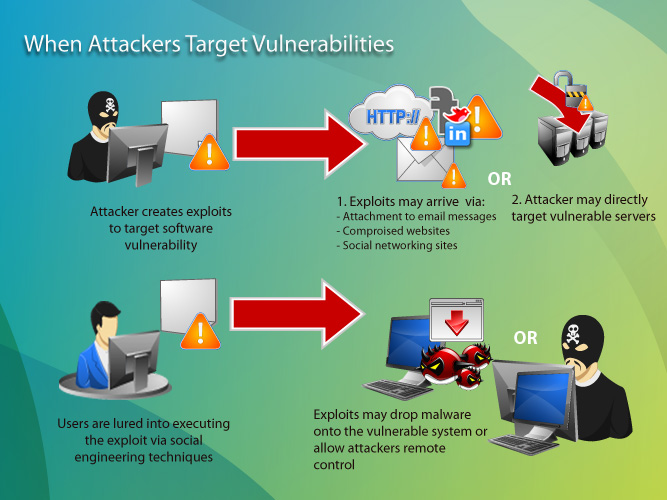
This post will try dig into the topic of Software security. Most non-trained audience in Information Security is familiar with terms such as Vulnerabilities, Exploits, PatchesCyber-attacks, which relate with Software Security. The relation among those terms is the following: most Cyber-attacks are possible because of the existence of software Vulnerabilities in Applications or Operating Systems which attackers are able to exploit. More precisely, attackers are able to take advantage of a vulnerability through what is called an “Exploit”, software code which allows them to gain unauthorized access to a system or to compromise its functionality (denial of service attack) .

Software vulnerabilities represent security gaps resulting from unintended flaw (errors) in software code or a system that leaves it open to the potential for exploitation in the form of unauthorized access or malicious behavior;   Vulnerabilities can be closed by software vendors through patches: it is up to the user to apply the patch, and quite surprisingly there is a small minority who apply them in a timely fashion. While for home users this is essentially unjustifiable, companies may have good practical reasons for being unable to patch on a regular and timely basis. Unless companies have a Vulnerability Management Process in place, chances are that their patching activity is other than timely and not performed on a regular basis; even when a Vulnerability Management Process is in place, it is my experience that companies may have a hard time to patch systems on a regular basis, sometimes for lack of resources within the Operation teams, sometimes because the testing phase of the process produced results which affected performance in a negative way.

This infographic produced by Trend Micro explains quite effectively how Cyber-attacks succeed:

03920122011

One common way to exploit a system is through the usage of Malware, parasite software which in stealth mode will perform undesirable actions leading to system and information compromise.

Some internet domains, generally referred as “Malicious domains” are known to be offenders in this area by trying to install malware by either exploiting browser vulnerabilities or gullible user behavior (acceptance of the browser request to install some form of software, often camouflaged under a fake name, such as “latest version or Flash needed to play the content you selected” or other easily recognizable names by most users). If you are unsure whether a domain is safe (malware-free), Trend Micro offers a tool in this page. And you might be surprised to discover that most of the malicious domains are registered not in Russia, China or Africa, but rather in the United States, according to the findings of Trend Micro summarized below:

Top malicious country sources


As previously mentioned, Software vendors when becoming aware of a new vulnerability in their products will take action to release a Patch which, when applied by the product user, will eliminate the vulnerability and will restore the intended safe operation of the software.

So what happens in between the moment in which a vulnerability exploit is released by hackers and the moment in which the software vendor releases the patch? This is the ground in which the so called “Zero day attacks” will go wild and likely deliver the expected results to the hackers behind them. Zero-day attacks occur during the vulnerability window that exists in the time between when vulnerability is first exploited and when software developers publish a counter to that threat. Zero-Day exploits are usually posted by well-known hacker groups. Software companies then issue a security bulletin or advisory when the exploit becomes known, but they may not be able to offer a patch to fix the vulnerability for some time after: when they do release it immediately, chances are that they “bought” the resolution from the same authors of the exploits (often true also for Anti-virus software vendors). It is a fact that one of the stronger motivations of hackers to develop vulnerability exploits is to sell the “antidote” to software vendors before zero day attacks run wild.

This study conducted by Secunia Inc. found that, in 2013, 86% of the vulnerabilities of the top 50 software programs are available on the day of disclosure, hence only 14% of the vulnerabilities are subject to zero-day-attacks (10% in 2012).


Patches zero day


The same study, when its scope is not limited to the top 50 software programs, found out that in 2013 79% of all software has a patch available in the same day a vulnerability is discovered.


Patches zero day all sftw


Another interesting finding from the Secunia study is the growing trend of vulnerabilities in the last 5 years, which seems to reinforce the idea that “discovering and exploiting vulnerabilities is profitable business these days”.


Vulnerability 5-y trend


Also, while the number of discovered vulnerabilities is growing (over 13,000 in 2013), the number of affected software products is decreasing (2289 in 2013) as shown in the chart below:


vuln-prod


Among those over 13,000 vulnerabilities discovered in 2013, just under 16.7% were classified highly or extremely critical. Out of 13,073, this percentage represents a hefty number of vulnerabilities : 2184 !


vuln criticality


And, if you were wondering, no less than 73% of those discovered vulnerabilities can be exploited from remote. So most of them are exploitable by cyber-attackers located all over the world.


vuln vector


If you want to read more, you can download the whole Secunia study here:  secunia_vulnerability_review_2014.


Once the counter is out, that exploit is no longer a “zero day exploit”. So does it mean that the threat is no longer there? No, at least until the patch is applied, which requires some form of user intervention. So cyber-attackers can still count on some form of user-inaction to continue exploiting systems affected by a known vulnerability.

Among home-users, the need for patching is not fully understood. Most non-technical users follow the reasoning that “If my system is running fine, why would I bother patching it? After all it takes quite a bit of time…”. This obviously denotes a low risk perception in most users. In fact there are many psychology studies which have proven that the more we like an activity or tool, the less we perceive its risks. So enthusiastic computer users do not fully perceive all the hazard out there. They might be concerned about the safety of their house door and windows (and justifiably so) in order to prevent theft from physical attackers, but not so much from theft from virtual attackers, which are in an enormously larger number than the thieves who may try accessing your home.

Among companies, the need for patching their systems is generally better understood, but they seldom do it timely, if they do at all.

One recent study of 2013 showed that only 36% of small business apply security patches at all and it concludes that “it is no wonder that cybercrooks are stealing their cash“. In fact, taking the U.K. as an example, the FSB (Fedearation of Small Business) has estimated that  small firms lose about 700 million pounds every due to cybercrime activities (read more here). The average attack caused Small and Medium Business (SMB) between £35,000 and £65,000 worth of damage – while large firms breaches set them back by an average of £450,000 to £850,000, although several individual breaches cost more than £1m (read more here). The same survey also revealed that 93 per cent of large organisations (those which employ more than 250 workers) had reported security breaches in the past year, while the percentage of small and medium business affected by at least a security breach is 87%.


breaches survey


You can download the whole report here: 2013-information-security-breaches-survey-executive-summary


So even though there is a cost to it, evidence is there that not just home users but also businesses are not timely in their patching, if they do it at all. One of the most striking evidence of this was provided to the general public earlier this year when Heartbleed was discovered as a huge OpenSSL encryption bug. Users were told their account on multiple web site affected by the bug (the sites using version 1.0.1 and 1.0.2-beta releases of OpenSSL,) were compromised and, at the same time, they were told not to update their account on each web sites until those were properly patched. And it took a long while until all the affected sites were patched. CNET and other sites published and regularly updated a list of web sites which had been patched. It did take a long while until the list of sites still at risk became empty.

The main reasons why companies do not patch their systems immediately are generally rooted into either lack of resources or the time needed for the patching process to complete.

An appropriate Vulnerability Patching Process (also called System Patching Process) is a fairly complex process which can be quite resource intensive. A test environment, ideally an identical copy of the production environment, should be available to test the systems after the patches are applied. This is no trivial effort. Testing is the crucial part of the Patching process. No software vendor can guarantee that the interaction of that software with the rest of the ecosystem which it is part of will remain flawless after the patch is applied. For example, when Microsoft releases a Windows patch it does not guarantee that whatever software you have installed in your workstation or server will continue to work as before once the patch is applied. You have to test by yourself. Sometimes warnings are released along with the patch (“known issues”) as a clue of what could happen. Other software vendors may list new minimum requirements in order to successfully apply the patch and this can lead to a “no-go” decision for patching. For example in order to apply this patch to software “x”, you need to have version “y” or newer of the OS in place. If you have an earlier version, you have to hold until you upgrade your OS.

You can see easily how complex this can become. So when a company does not patch immediately their systems it is not necessarily at fault: they may have some pre-requisite actions to do first.


A few more notions I want to touch in this post are how the public is alerted about new vulnerabilities and how those are classified in terms of severity of impact.


Vulnerability Bulletins: 

This is how the public is informed about the discovery of new vulnerabilities. Both non-profit and commercial organizations are publishing free vulnerability bulletins. These bulletins offer much information, including the date of discovery, systems affected, severity ranking through CVSS score and links to vendors for patching recommendations. IBM, Microsoft, Cisco, Oracle, Adobe, Red Hat,  to name a few, all issue periodic vulnerability bulletins. Companies like Microsoft release updates and patches so regularly that the term “Patch Tuesday” has been adopted to refer to the second or fourth Tuesday of each month in North America when Microsoft patches and updates are released to the public.

Companies are encouraged to subscribe (for free) for getting regular updates.


Severity ranking of vulnerabilities

Vulnerability are ranked when discovered with a CVSS (Common Vulnerability Scoring System) number: the higher this number (from 1 to 10), the more critical the exposure for the company in relation to this vulnerability. The purpose of the CVSS base group is to define and communicate the fundamental characteristics of a vulnerability. However only the final users will be able to provide that contextual information that more accurately reflects the risk to their unique environment. This allows them to make more informed decisions when trying to mitigate risks posed by the vulnerabilities.

Therefore companies should prioritize their patching process based on the criticality of the vulnerability assessed first through the CVSS scoring system and then in relation to their specific environment. This last step may lead to decrease significantly the criticality level of the vulnerability espressed by the CVSS (sometimes for the presence of specific security controls, sometimes because one or more of the necessary conditions for the vulnerability to be exploited is not present) or leaving it unaltered. The more critical a vulnerability is assessed, the earlier should be addressed (if the patch is available). It is normal for most patching process to address vulnerability ranked from 7 to 10 within a month from their discovery if their environment is confirmed to be vulnerable.

Another frequently heard system to measure the severity of software vulnerabilities is the CWSS, Common Weakness Scoring System, which assigns a number between 1 and 100 to measure the severity of the vulnerability.


Top 25 Software error list (CWE/SANS Top 25)

This scoring system is used in the Top 25 Software Error list, also called CWE Top 25. This is a very important reference updated on a periodic basis: the last list is date 2011 and the results can be found here. At the top of the list of 2011 is found “SQL Injection” which, with a score of 93.5/100, is ranked as the most critical software vulnerability around. The list also assesses important factors related to each vulnerability category, such as the cost of remediation, ease of detection, consequences. etc (see screenshot below).


SQLINJ

This is a brief summary of the 2011 list:

CWE


OWASP Top 10 Software Vulnerabilities

Another very useful list of software vulnerabilities ranked by severity is the OWASP Top 10.  The OWASP Top Ten represents a broad consensus about what the most critical web application security flaws are. This list is updated on a periodic basis also: it most recent update is dated 2013, hence more recent than the last iteration of the CWE Top 25, dated 2011. Not surprisingly, the 2 list results are essentially consistent. For example bith rank SQL Injection as the most dangerous software vulnerability.

Companies are encouraged to adopt this awareness document within their organization and start the process of ensuring that their web applications do not contain these flaws. Adopting the OWASP Top Ten is perhaps the most effective first step towards changing the software development culture within your organization into one that produces secure code.

This is a brief summary of the 2013 list:

OWASP


There is one unanswered question in all this discussion: why vulnerabilities exist and what to do about it. 

This will be covered in a future, more technical post. Stay tuned if interested.